

A well-maintained Google Business Profile is the single most effective free tool a local business owner has for winning customers from search. To optimize Google Business Profile in 2026 means keeping it accurate, active, and aligned with Google’s AI-driven ranking signals. Businesses that treat their profile as a living asset rather than a one-time setup consistently outrank competitors who set it and forget it. Spinlisting data shows that well-maintained listings deliver 5x greater value than unclaimed ones. The gap between active and passive profiles has never been wider.
What are the prerequisites to optimize your Google Business Profile?
Before any optimization work pays off, your profile must be claimed and verified. Google requires verification through a postcard, phone call, email, or video depending on your business type. Skipping this step locks you out of editing your own listing and hands control to whoever claims it first.
Once verified, set up a recovery email and a secondary owner so you never lose access. Many local businesses lose months of ranking history because a former employee held the only admin account. Access management is not glamorous, but it is the foundation everything else sits on.
The core assets you need before starting:
- A verified Google account linked to your business email
- High-resolution photos: exterior, interior, team, and products
- A complete business description (750 characters maximum)
- Your primary and secondary category selections
- Accurate hours, phone number, and website URL
- A dedicated local landing page on your website
| Tool or resource | Purpose |
|---|---|
| Google Business Profile dashboard | Central hub for all edits and performance data |
| Gemini app | AI-assisted content creation and trend analysis |
| Google Search Console | Tracks organic impressions tied to your profile |
| Local landing page | Reinforces keyword relevance for your service area |
| Review management workflow | Keeps response times short and sentiment positive |
Pro Tip: Create a shared folder with all your approved photos, descriptions, and hours before you start editing. Inconsistent information entered in stages is one of the top causes of ranking drops.
Which steps should you follow to improve your Google business listing in 2026?
Optimization is not a single action. It is a sequence of decisions that compound over time. Follow these steps in order and revisit them every quarter.
1. Choose the most specific primary category available.
Specific categories improve local search relevance by matching your profile to the exact searches your customers use. “Italian Restaurant” outperforms “Restaurant” every time. Add secondary categories only when they describe real services you offer.
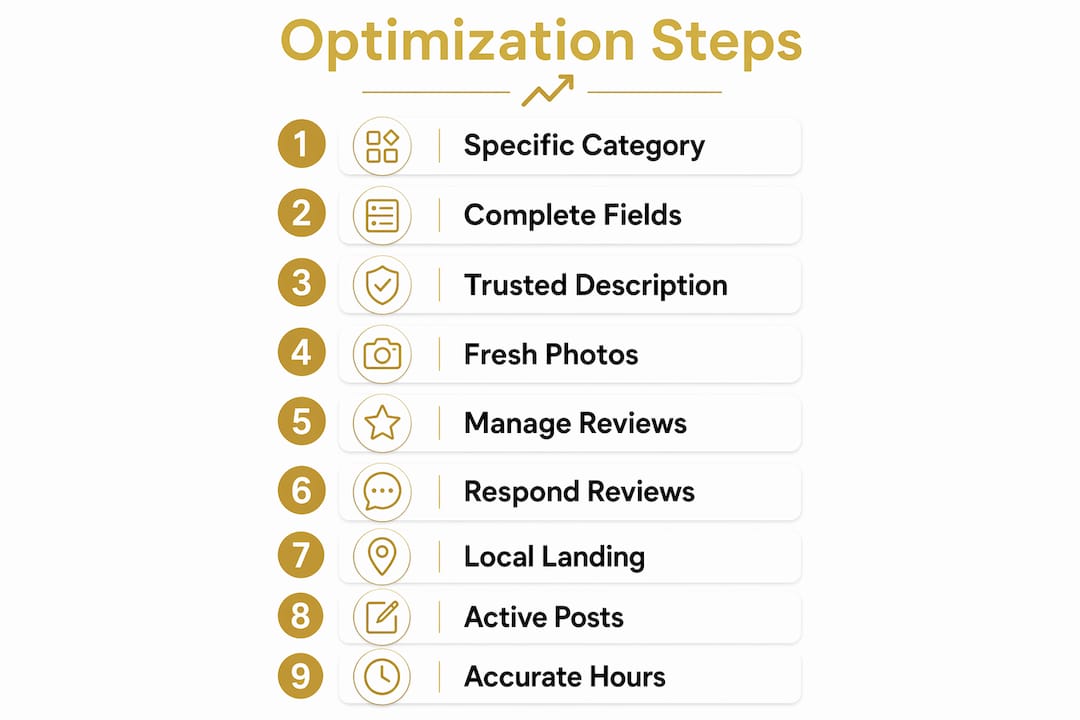
2. Fill every field in the profile completely.
Google rewards completeness. Hours, phone number, website, service area, attributes, and the business description all feed the ranking algorithm. Leaving fields blank is the equivalent of handing ranking points to a competitor.
3. Write a business description that builds trust.
Your description should explain what you do, who you serve, and what makes you different. Write it for a first-time reader, not a search engine. Avoid repeating your business name or category keyword more than once. The description is indexed, but it reads better when it sounds human.

4. Upload fresh photos on a consistent schedule.
Profiles with fresh photos uploaded at least every two weeks outperform those with photos older than 18 months. Google reads photo activity as a freshness signal. Rotate through exterior shots, team photos, product images, and behind-the-scenes content.
5. Manage reviews as a ranking asset.
Review sentiment and recency now carry more weight in Google’s 2026 ranking algorithm than in prior years. Ask every satisfied customer for a review immediately after the transaction. The request timing matters because memory fades fast.
6. Respond to every review, including negative ones.
Authentic responses to reviews build trust and positively influence customer decisions. A short, genuine reply to a one-star review shows future customers that you take problems seriously. Never copy-paste the same response to multiple reviews.
7. Link your profile to a dedicated local landing page.
Hyper-local landing pages reinforce entity alignment and increase local search rankings. The page should include your city, service keywords, and a clear call to action. Linking to a generic homepage wastes the SEO signal.
8. Use posts and Q&A to keep the profile active.
Google Posts expire after seven days. Publish at least one post per week covering offers, events, or updates. Seed the Q&A section with questions your customers actually ask, then answer them yourself before a stranger does.
9. Add booking links and confirm your hours are accurate.
Inaccurate hours are the fastest way to lose a customer who drove to your location and found it closed. Update hours for holidays, special events, and seasonal changes the moment they are confirmed.
Pro Tip: Set a recurring calendar reminder every Monday to publish a new Google Post and check that your hours are current. This single habit puts you ahead of 80% of competitors who treat their profile as static.
How does Google’s Gemini app enhance your profile management in 2026?
Google’s Gemini app integration is the most significant new tool available for local business owners managing their profiles in 2026. Connecting your Business Profile to Gemini gives you an AI assistant that references your actual business data to brainstorm content, analyze trends, and suggest improvements.
What Gemini can do for your profile:
- Analyze search impressions and surface which queries drive the most profile views
- Draft review responses that match your brand tone while staying authentic
- Suggest post topics based on seasonal trends and your service categories
- Identify gaps in your profile data that may be suppressing visibility
- Organize business notes and content calendars inside a single workspace
The practical benefit is time. A local business owner managing a restaurant, a plumbing company, or a retail shop does not have hours to spend on content strategy. Gemini compresses that work into minutes.
Pro Tip: Use Gemini to generate three to five draft review responses at once, then personalize each one before posting. You get the speed of automation with the authenticity that customers can actually tell apart from a bot.
Google’s Gemini AI integration is rolling out globally in 2026. Early adopters who connect their profiles now will build a data advantage that compounds as the AI learns their business patterns over time.
What common mistakes undermine your Google Business Profile rankings?
Most ranking problems trace back to a short list of avoidable errors. Recognizing them early saves months of lost visibility.
The most damaging mistakes local businesses make:
- Keyword stuffing the business name. Keyword stuffing is flagged by Google’s 2026 spam detection and frequently leads to profile suspension. Your business name in your profile must match your real-world signage exactly.
- Choosing broad or irrelevant categories. A general category reduces your relevance score for specific searches. Pick the narrowest category that accurately describes your primary service.
- Ignoring photo uploads for months at a time. Stale photos signal an inactive business to Google’s algorithm. Freshness matters as much as quality.
- Linking to a generic homepage instead of a local landing page. A homepage optimized for your brand does not carry the same local keyword signals as a page built for your city and service.
- Leaving customer questions unanswered. Unanswered questions in the Q&A section get answered by strangers, sometimes incorrectly. Check the section weekly.
- Mismanaging business hours. Incorrect hours generate negative reviews and reduce trust scores in Google’s local ranking system.
Businesses that follow Google’s 2026 guidelines consistently, meaning accurate information, regular activity, and genuine engagement, outperform those chasing shortcuts every time.
Over-optimization tactics like keyword stuffing and irrelevant category choices are penalized more aggressively under Google’s 2026 algorithm updates. The algorithm has shifted toward rewarding authenticity and consistency over manipulation.
Key Takeaways
A fully active, accurately maintained Google Business Profile is the most direct path to higher local search rankings and more customer engagement in 2026.
| Point | Details |
|---|---|
| Claim and verify first | An unverified profile cannot be edited and loses ranking potential immediately. |
| Category specificity wins | Choosing the most specific primary category matches your profile to exact customer searches. |
| Freshness signals matter | Upload new photos every two weeks and post weekly to show Google an active business. |
| Reviews drive rankings | Review recency and sentiment now carry heavier weight in Google’s 2026 local algorithm. |
| Avoid over-optimization | Keyword stuffing in your business name triggers spam detection and risks profile suspension. |
Why consistent activity beats one-time setup every time
Most local business owners treat their Google Business Profile like a business card. They fill it out once, maybe add a few photos, and move on. That approach worked in 2019. It does not work now.
What I have seen consistently is that the businesses ranking at the top of local search are not the ones with the most reviews or the biggest budgets. They are the ones showing up every single week. A new post on monday. A review response on tuesday. A photo upload on thursday. That rhythm tells Google’s algorithm that the business is alive, relevant, and worth showing to searchers.
The Gemini integration changes the effort equation significantly. You no longer need to spend an hour crafting a post or a review response. You spend five minutes reviewing what the AI drafted and making it sound like you. That is a realistic commitment for any business owner.
The mistake I see most often is treating optimization as a project with a finish line. There is no finish line. The businesses that accept that reality and build a weekly routine around their profile are the ones that hold first-place rankings month after month. Spinlisting’s approach of ongoing, personalized optimization reflects exactly that mindset. It is not about one big push. It is about showing up consistently when your competitors do not.
— Against
How Spinlisting helps you maintain top rankings in 2026
Keeping a Google Business Profile fully active takes consistent effort across photos, posts, reviews, and data accuracy. Spinlisting combines local SEO expertise with AI-assisted content creation to handle that work for local business owners who cannot afford to let their profile go quiet.
Spinlisting’s approach integrates ChatGPT-powered content generation with proven local SEO practices, producing the kind of regular profile activity that Google’s 2026 algorithm rewards. Clients have seen 83% increases in first-place rankings through this ongoing model. If you want your profile to outperform competitors without spending hours each week managing it yourself, Spinlisting offers the tools and the team to make that happen.
FAQ
What does it mean to optimize a Google Business Profile?
Optimizing a Google Business Profile means keeping all information accurate, uploading fresh photos regularly, responding to reviews, and using posts and categories to match how customers search locally.
How often should I update my Google Business Profile in 2026?
Update your profile at least weekly. Publish a new post, respond to any new reviews, and upload a photo every two weeks to maintain the freshness signals Google’s algorithm favors.
Does category selection really affect local search rankings?
Yes. Choosing the most specific primary category directly improves your relevance for targeted local searches and is one of the highest-impact changes you can make to your profile.
Can keyword stuffing in my business name help rankings?
No. Google’s 2026 spam detection flags keyword stuffing in business names and frequently suspends profiles that use it. Your business name must match your real-world signage exactly.
What is the Gemini app and how does it help local businesses?
The Gemini app connects to your Google Business Profile and acts as an AI assistant that drafts content, analyzes search trends, and suggests profile improvements based on your actual business data.